You gave your AI permission for one task. GUARDIANA checks who it really talked to. Cutting it off is your call.
You asked it to sort the invoices. Do you know how many services it talked to on the way? GUARDIANA writes down the name of each one, the time and the device. Never the content: it looks at where it talks, not what it reads.
For the first 24 hours it only watches; then you decide. Windows and Linux, and with Home Mode the phones too, with nothing installed on them. No account, no server of ours, no telemetry. Open source: the guardian you can watch yourself.
NO ACCOUNT · NO CARD TO TRY PLUS · OPEN SOURCE
You asked it to sort the invoices. Do you know how many services it talked to?
An artificial-intelligence agent works with your keys: your folders, your accounts, your network. You give it permission for a task and it does the task; what you do not know is how many places it talks to along the way, because nobody shows you. GUARDIANA sits between your machine and the internet and shows you, so you can hand the work to the agent without standing over it.
The limit, said here and in the program: GUARDIANA checks where your agent talks, not which files it opens nor what travels inside each connection. An agent that only touches files on your disk asks for no name and does not show up. Neither does what leaves through a VPN or an app’s own encrypted DNS, which is recorded when detected.
The first receipt of a real AI agent is published before 30 September 2026, with the protocol already fixed: clean machine, rest period, one task, invented files, everything that was asked for, and the raw JSON so anyone can repeat it.
DNS. Almost everything that goes out to the internet starts by asking «where is this service?», and GUARDIANA is what answers that question on your PC (and in your home, with Home Mode). It is not a proxy and not a driver: it does not sit in the middle of the traffic and never opens what you send or receive; it only sees the name that was asked for, the time and which device asked.
Almost every device, before it talks to a service, asks for its name. GUARDIANA stands at that point.
Inside your computer, GUARDIANA answers those questions and records what it sees: the service name, the time and which device asked. Never the content. With Home Mode, phones and the TV too, without installing anything on them. Click a step or let the animation walk you through.
YOUR DEVICES
Computer, phones, TV, everything on the Wi-Fi
SERVICE NAME
Every connection starts by asking “where is this service?”
CATEGORY AND SIGNAL
Tracker, advertising, telemetry, expected or unknown, with one sentence
YOUR DECISION
Cut or let through; never before 24 h; always with undo
Phones too. Nothing installed on them.
Turn on Home Mode on your PC and change one setting on the router or on each phone. From then on, GUARDIANA sees which services every device on your Wi‑Fi tries to talk to. Only in your home. No app. No account. No store.
Those who promised to protect you sold your data. Those who sold you the device were listening.
Regulator rulings, court settlements and government decisions from several countries, with date and source. That is why we do not ask you to trust us: we publish the code, the hash and the signature of every version. Where a company denied the facts, we say so.
Avast · sold the browsing of the people it protected
The FTC found that Avast, while promising to block tracking, sold detailed, re-identifiable browsing data to more than 100 third parties through its subsidiary Jumpshot between 2014 and 2020. It is banned from selling browsing data for advertising. Avast disagrees with the characterisation of the facts.
FTC · FEB 22, 2024See the record →Siri · recordings without "Hey Siri"
Court-approved settlement in Lopez v. Apple: the plaintiffs alleged that Siri recorded conversations without intentional activation and that human contractors reviewed them. Apple paid without admitting wrongdoing.
US DISTRICT COURT N.D. CAL. · 2025See the record →CrowdStrike · a faulty update took down millions of PCs
On July 19, 2024 an update to the CrowdStrike Falcon security software caused blue screens on about 8.5 million Windows devices, according to Microsoft. Airports, hospitals and banks ground to a halt. It was not an attack: it was the guardian itself.
MICROSOFT · JUL 20, 2024See the record →Amounts in the currency of the original ruling. A settlement does not imply admission of guilt: Apple and Avast denied the allegations. We include them because the pattern — privacy promised, something else delivered — is what GUARDIANA avoids by design: nothing leaves your home towards us. Case files are shown in Spanish; every link goes to the original document.
Windows warns about what it does not know yet, signed or not. That is why we teach you to check the file.
In exchange for waiting for the signature you get something better than a seal: the full code, a reproducible build and the public hash of every version. You verify, or anyone you trust.
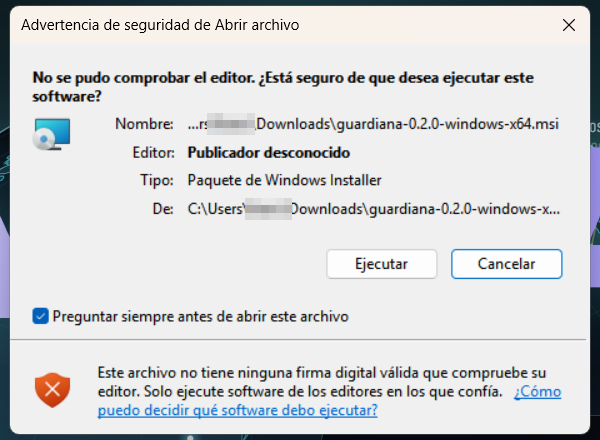
Windows shows a blue warning to installers its reputation system does not know yet. Without a publisher certificate it always appears; with one it still can, because since 2024 that reputation is earned through downloads and no certificate grants it, not even the expensive ones. We do not sign it today, and here is why: a seal costs money and does not remove the warning, so we would rather spend that on keeping the program free and checkable. We do not teach anyone to skip warnings: we teach you to verify. Once you check the file’s hash and signature, the warning no longer matters, because you no longer depend on Windows telling you whether to trust it.
We know the warning scares people and will cost us users in the first weeks. We accept that before teaching anyone to skip warnings.
It is also a technical decision: we do not intercept your traffic, we do not read content, we have no user account and no server holding your data. Less surface, less to attack.
Three steps to check the file before you open it
1 · Take the hash of the file you just downloaded
On Windows, in PowerShell. On Linux, in the terminal. Nothing to install, and you do not open the file.
Get-FileHash guardiana-1.0.0-windows-x86_64.exe -Algorithm SHA256sha256sum guardiana-1.0.0-linux-x86_642 · Compare it with the one in the public log
Every version is written into a public log (ledger.jsonl) before the download exists, with its hash, the commit it came from and the Rekor entry that proves the date. If the two hashes are not identical, the file is not ours: delete it.
3 · Check the signature
Every file carries its minisign signature next to it. The public key is published on this page and travels inside the program itself; once installed, «guardiana verify» repeats the three steps for you.
minisign -Vm guardiana-1.0.0-linux-x86_64 -P <public key>The hashes and the key are not here yet: they are published on 5 October 2026, with version 1.0.0 and before the download. Publishing them earlier would mean showing a number nobody can check.
We do not ask you to trust us. We give you the tools to check.
GUARDIANA was born in 2026 in Cartagena de Indias with an awkward question: why would anyone trust a new program placed in the middle of their home? Our answer is not to ask for trust. These are the commitments we take by design, and anyone can check them.
Francisco Salvatierra Sánchez
Founder and sole developer. Cartagena de Indias, Colombia. The same name that appears in the privacy notice and the terms: if something goes wrong, there is no department to hide behind.
The whole program is at github.com/guardianagroup/guardiana, under the GPL-3.0: you can read it, build it and check that what you install is what was published. This site sits next to it, in the same place. A personal account, no company behind it, so there is no doubt about who publishes what.
Write to hola@guardianagroup.com and I answer personally. What I promise and how fast is in /.well-known/security.txt. There is no money bounty; there is public credit in the release notes of the version that fixes it, if you want it.
Commitments we take by design
No black box. Every line that runs on your machine will be public from day one.
Anyone will be able to compile and get the same hash as the installer you download. You verify without anyone's seal.
The hash and signature of every version go to the public log (and to Rekor) before the file can be downloaded. Nothing is deleted, not even by us.
We see service names, time and device. Not content, not how much data, not which app asked for it on a phone. We say so on every screen.
No user account, no telemetry, no server with your data. What does not exist cannot leak.
Free and open, the complete guardian. Plus: 7 days free, then monthly or yearly.
No ads, no data sales, no investors asking otherwise. The complete guardian is free and open source: your computer and the whole home. It is what makes us grow and it stays that way. What you pay for is the human layer: up-to-date lists of who each device talks to, explained in plain language; the weekly home report; several homes; priority support. Plus comes with a 7-day free trial, then you pay monthly or yearly (the year is 20% less); cancel whenever you want; it opens on October 5. Each country sees the price for its region; the free version is the same for everyone. No account: the licence activates with a single connection, or with a signed file if you would rather not even that.
Free
FreeFOREVER · OPEN SOURCE
- The complete guardian: your PC and the whole home
- Home Mode: phones, TV and everything on the Wi-Fi, nothing installed on them
- X-ray and chained ledger
- Cut with undo, after 24 h of observation
- Installation check (guardiana verify)
Plus
Subscription7 DAYS FREE · THEN MONTHLY OR YEARLY (−20%) · EACH COUNTRY SEES ITS PRICE
- The human layer on top of the free guardian
- Up-to-date lists of who each device talks to, explained in plain language
- Weekly home report
- Several homes
- Priority support
- Activation with a single connection, or with a signed file
- 2.0 (\\
- ) included
- Cancel whenever you want
Your home, watched from your computer.
Windows and Linux. The complete guardian, free: your computer and the whole home. Plus, the human layer, with 7 days free and a monthly or yearly subscription. No card. No account. No need to trust us: you can verify everything.
What leaves your PC, measured.
Each x-ray is a dated test with its method: one browser or one website, two minutes, and the full list of names that left the machine according to GUARDIANA. Names, not content. Data to download and a method to repeat it. In Spanish for now.
What people ask us by email.
No. Your antivirus watches the files on one PC; GUARDIANA watches who each device on your Wi-Fi talks to. They complement each other. Windows Defender comes free and is good: keep it on.
No. You install GUARDIANA on your PC and, if you want to cover the phones and the TV, you follow a two-minute guide for your router or for each device. The panel explains everything in one sentence.
Your PC keeps browsing normally, because it keeps its usual DNS as a backup. The devices you pointed at the PC use the backup DNS you left in the router: nothing breaks, they just stop being watched while the PC is off, and when you turn it on GUARDIANA tells you how long it was not looking.
Because the complete guardian is what makes us grow and it stays that way: open source, no account, no server of ours. What we charge for is the human layer: up-to-date lists explained in plain language, the weekly report, several homes and priority support (Plus, with 7 days free). No ads and no data sales.
DNS. Almost everything that goes out to the internet starts by asking «where is this service?», and GUARDIANA is what answers that question on your PC (and in your home, with Home Mode). It is not a proxy and not a driver: it does not sit in the middle of the traffic and never opens what you send or receive; it only sees the name that was asked for, the time and which device asked.
It does not see it, and it says so. A VPN, an app with its own encrypted DNS (DoH/DoT), iCloud Private Relay or a program that uses a fixed IP skip the name question. When GUARDIANA detects that a device is trying that path, it writes it down as a signal («DNS evasion») so you know there is traffic it is not watching. The full list of what it does not do is published next to the code.
Sources
Every figure on this site that is not a reading from your own browser or a labelled mock-up comes from one of these sources. Consulted in September 2026.
See all 44 sources
- The Verge — National Public Data confirms the 2.9 billion-record breach (Aug 16, 2024)
- Citizen Lab — CatalanGate: Pegasus and Candiru against 65 people in Spain (Apr 18, 2022)
- FBI + CISA — Joint statement on the Chinese intrusion into US carriers (Nov 13, 2024)
- Reuters — Google to destroy Incognito browsing data to settle the lawsuit (Apr 1, 2024)
- GeekWire — T-Mobile: $350M settlement over the breach of 76M people (Jul 22, 2022)
- Journal of IT Teaching Cases — The Vastaamo case (2024)
- OAIC — Enforcement action against Medibank over 9.7M Australians (Jun 5, 2024)
- elDiario.es — Spain's AEPD fines LaLiga €250,000 over its app's microphone (Jun 11, 2019)
- INCIBE — The AEPD fines Vodafone €8.15M (Mar 2021)
- The New York Times — ToTok, the messaging app used as a spying tool (Dec 22, 2019)
- Google Security Blog — Unauthorised CNNIC/MCS Holdings certificates (Mar 23, 2015)
- Apple Newsroom — Apple sues NSO Group (Nov 23, 2021)
- FTC — Google and YouTube to pay $170M over children's privacy (Sep 4, 2019)
- DPC Ireland — WhatsApp decision: €225M (Sep 2, 2021)
- Autoriteit Persoonsgegevens — €290M to Uber over driver data transfers (Aug 26, 2024)
- OCC — $80M to Capital One over the 2019 breach (Aug 6, 2020)
- FTC — Avast: ban on selling browsing data and $16.5M (Feb 22, 2024)
- TechRadar — 8 PB of data amassed by Jumpshot (2024)
- US Dept. of Commerce — Final determination against Kaspersky (Jun 20, 2024), via National Law Review
- Microsoft — CrowdStrike incident: 8.5M devices (Jul 20, 2024)
- US Dept. of Commerce — NSO Group added to the Entity List (Nov 3, 2021)
- The Guardian — PRISM (Jun 6, 2013)
- DPC Ireland — €1.2B to Meta (May 22, 2023), via Hunton
- DPC Ireland — €390M to Meta over personalised advertising (Jan 4, 2023)
- FTC — $5B to Facebook (Jul 24, 2019)
- New Jersey Attorney General — $391.5M from Google over location tracking (Nov 14, 2022)
- CNIL — €50M to Google (Jan 21, 2019)
- European Commission — €4.34B to Google over Android (Jul 18, 2018)
- Courthouse News — Approval of the $95M settlement in Lopez v. Apple (2025)
- European Commission — €1.8B to Apple over music streaming (Mar 4, 2024)
- FTC — Ring $5.8M and Alexa $25M (May 31, 2023)
- BDO — Context: €746M to Amazon (2021)
- DPC Ireland — €310M to LinkedIn (Oct 24, 2024)
- DPC Ireland — €345M to TikTok (Sep 15, 2023)
- FTC — $150M to Twitter (May 25, 2022)
- FTC — $520M to Epic Games (Dec 19, 2022)
- Autoriteit Persoonsgegevens — €30.5M to Clearview AI (Sep 3, 2024)
- FTC — Equifax settlement (Jul 22, 2019)
- FTC — Expanded settlement with Uber (Apr 12, 2018)
- SEC — $35M to Altaba/Yahoo (Apr 24, 2018)
- Hunton — ICO fines Marriott International £18.4m (Oct 30, 2020)
- CNBC — ICO fines British Airways £20m (Oct 16, 2020)
- IBM — Cost of a Data Breach Report 2025
- Help Net Security — Summary of the IBM 2025 report