INSTALL
Installing GUARDIANA
Windows is going to warn you. That is expected, and this page exists so you know exactly what you will see, why, and how to check for yourself that the file is ours before you open it.
There is no download yet. Version 1.0 ships on Sunday 5 October 2026 at 15:00 UTC (10:00 in Colombia, 17:00 in Spain). That day the files, their hashes and their signatures appear here. The hashes are published in the public ledger before the download exists, which is the order that makes them worth anything.
1 · What Windows will tell you
When you open the installer, Windows shows a blue warning: “Open File – Security Warning”, with “Unknown publisher” and “This file does not have a valid digital signature”. The screenshot below is real, taken on Windows 11 on 15 September 2026 with this same program; only the machine's user name has been covered.
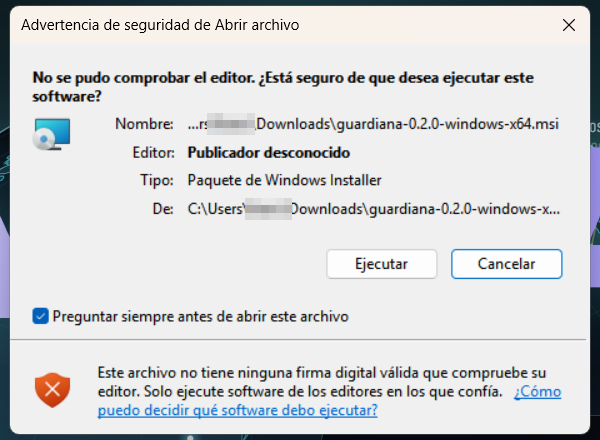
That warning does not say the program is dangerous: it says Windows does not know it yet. It shows for every installer without accumulated reputation, signed or not. With a publisher certificate it can still appear, because since 2024 reputation is earned through downloads, not bought.
We do not hide it and we will not teach you to click past it. We would rather lose users in the first weeks than train anyone to ignore the system's warnings. What we do instead is give you a way to check the file without trusting us.
2 · Three steps to check the file
All three happen before you open anything, and no extra tools are needed.
Step 1 · Take the fingerprint of the file you downloaded
On Windows, in PowerShell:
Get-FileHash guardiana-1.0.0-windows-x86_64.msi -Algorithm SHA256
On Linux, in the terminal:
sha256sum guardiana_1.0.0_amd64.deb
Step 2 · Compare it with the public ledger
Every release is written into a public ledger, ledger.jsonl, with its hash, the commit it
came from and the Rekor entry that proves the date. That ledger is published before the
download exists. If the two fingerprints are not identical, character by character, the file is not ours:
delete it and write to us.
Step 3 · Check the signature
Every file carries its minisign signature next to it. The public key is published on this
page and ships inside the program itself:
minisign -Vm guardiana-1.0.0-linux-x86_64 -P <public key>
Once installed, guardiana verify repeats all three steps on your own machine, and also tells
you whether the service is running, which DNS the system points to and which ports are open.
The hashes and the key are not here yet, and we are not going to invent them. They appear on 5 October, on this page and in the public ledger. Publishing a number nobody can check is not transparency: it is decoration.
3 · What the installer does, and what it does not
| Installs | The program in C:\Program Files\Guardiana (Windows) or /usr/bin/guardiana (Linux), and registers the service so it starts with the machine. |
|---|---|
| Does not change your DNS | Installing does not touch the system DNS. That change happens later, from the panel, with a button that says what it will do, and it is undone in the same place. |
| Opens no ports to the network | With Home Mode off, GUARDIANA listens only on your own machine. Ports towards the Wi-Fi open only if you turn Home Mode on, and guardiana verify lists them for you. |
| Asks for no account | No sign-up, no user, no server of ours. The Plus trial and key activation are the only connections that go out, and they are written into your ledger. |
| Sends nothing | Zero telemetry. Not while installing, not afterwards. |
4 · Linux
On Debian, Ubuntu and derivatives:
sudo apt install ./guardiana_1.0.0_amd64.deb
On any other Linux with systemd, the tarball brings its own installer:
tar -xzf guardiana-1.0.0-linux-x86_64.tar.gz && sudo ./instalar.sh
On Linux there are no unknown-publisher warnings: there is a hash and a signature, which is more checkable than a warning.
5 · macOS
On a Mac, GUARDIANA downloads as an ordinary application, GUARDIANA.app. The first time you
open it, macOS will say something like this: "GUARDIANA cannot be opened because Apple cannot check
it for malicious software".
That warning is more awkward than the Windows one, and we say so plainly: there is no "open anyway" button the first time. What you do is this, once:
- Right-click GUARDIANA.app and choose Open. Now the warning does offer an "Open" button.
- If it does not, go to System Settings › Privacy & Security, scroll to the notice about GUARDIANA and press "Open Anyway".
Why that warning appears, and why we work this way
For macOS not to warn, Apple requires the application to be notarised, and notarising requires a paid developer account. We do not have one today. We could have waited until we did and shipped for Mac later; we would rather ship now and tell you exactly what you will see and how to check it yourself.
Same as on Windows: we will not teach you to click past warnings blindly. We give you the file's fingerprint and its signature so you can check that what you are opening is ours, which is the only real reason to open it. On a Mac the check is the same as above, with the command macOS ships:
shasum -a 256 GUARDIANA.app.zip
What the installer does on a Mac
| Installs | The program in /usr/local/guardiana and a start-up service (a LaunchDaemon) that listens only on your own machine, on 127.0.0.1. macOS will ask for your administrator password: the system asks for it, we never see it. |
|---|---|
| Does not change your DNS on install | Same as on Windows. Before touching anything it writes down which DNS each of your networks uses today, so it can put it back exactly as it was. The change happens later, from the panel, with a button. |
| Opens no ports to the network | On a Mac, GUARDIANA listens only on the machine itself. |
| Home Mode: not on Mac yet | Home Mode is not in version 1.0 on macOS. Not because it cannot work: GUARDIANA does not manage the macOS firewall and we have not been able to test it there the way we did on Windows and Linux, so we neither vouch for it nor support it on a Mac. On Windows and Linux it is there, tested. |
To remove it, open the same GUARDIANA icon and choose to remove: the service stops, it is deleted, and your networks' DNS goes back to what you had before.
6 · Uninstalling
It uninstalls like any other program, and when it does GUARDIANA turns Home Mode off, removes the firewall rule and puts your DNS back exactly as it was, with whatever it pointed to before. What stays is your ledger, which is yours: it is on your disk and you delete it whenever you want.
7 · If something goes wrong
Write to hola@guardianagroup.com or open an issue at github.com/guardianagroup/guardiana. If what you find is a security bug, /.well-known/security.txt says what I promise and how fast.