How GUARDIANA works
Everything it does, in order: the question every device asks before it connects, the whole home, your AI, installing it and how to check everything.
Before your device can connect to any service, it has to ask where that service is. That question goes through GUARDIANA.
GUARDIANA answers those questions from inside your computer and writes down what it sees: the service name, the time and which device asked. Never the content. With Home Mode, phones and the TV too, without installing anything on them.
YOUR DEVICES
Computer, phones, TV, everything on the Wi-Fi
SERVICE NAME
Every connection starts by asking “where is this service?”
CATEGORY AND SIGNAL
Tracker, advertising, telemetry, normal or unclassified, with one sentence saying what each one is
YOUR DECISION
Block or let through; one name now, the broad ones after 24 h; always with undo
A trap that tells you who visited its address, without reading a single file
GUARDIANA can leave a file on your desktop that looks like a copy of your keys. There is no key inside: there is one unique internet address that exists nowhere else in the world. If anything reads that file — an AI, a browser extension, a web page — and goes looking for that address, the question passes through GUARDIANA. It is written down with the time and, on Windows, with the name of the program that asked. GUARDIANA never opened the file and does not know what is inside: it keeps looking only at names, as it does with everything else.
What this trap does not catch, said before you ask: a program that reads the file and sends it to its own server without looking up that address will not show. It is a trap for whoever follows the link, not a theft detector.
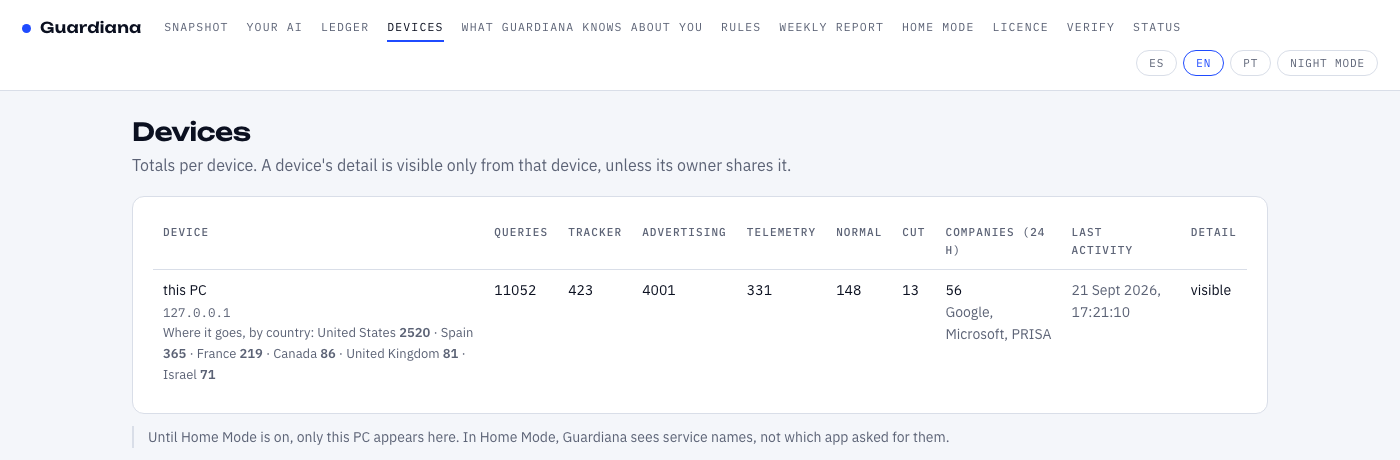
Phones too. Nothing installed on them.
Turn on Home Mode on your PC and change one setting on the router or on each phone. From then on, GUARDIANA sees which services every device on your Wi‑Fi tries to talk to. Only in your home. No app. No account. No store.
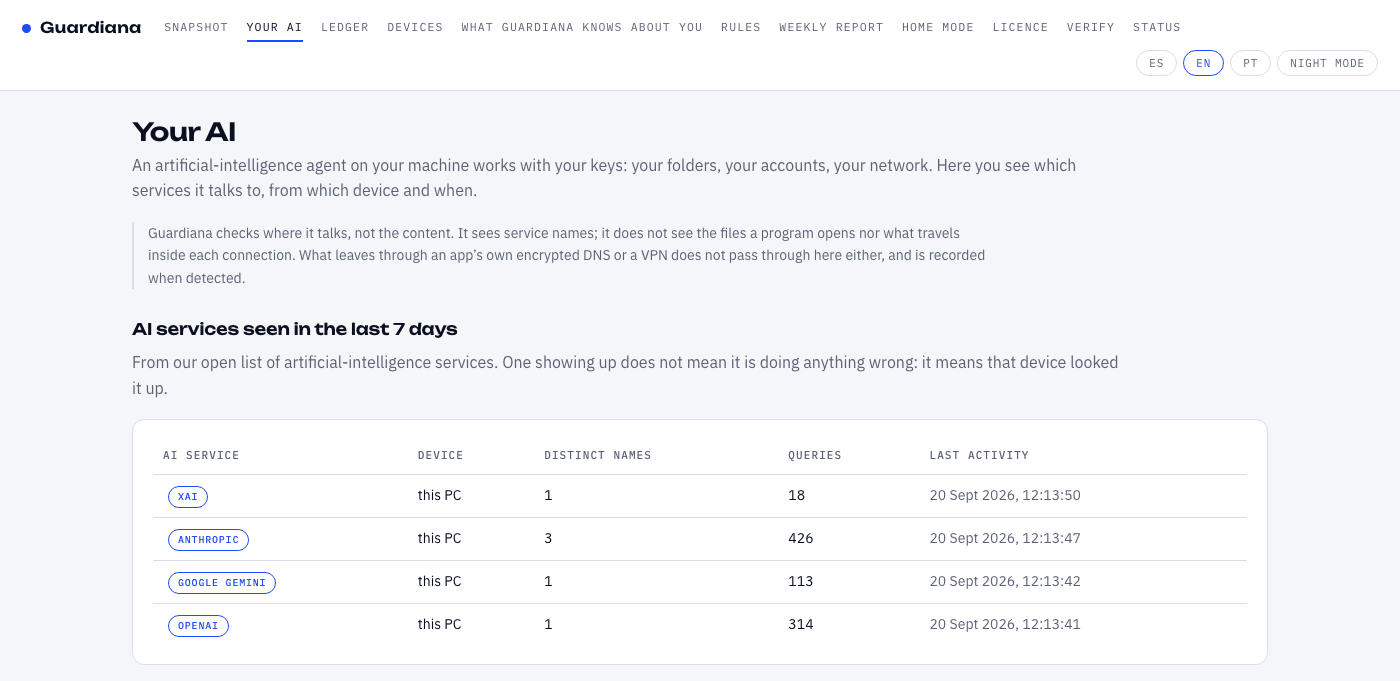
Your agent works with your keys. Do you know who it calls?
An artificial-intelligence agent works with your keys: your folders, your accounts, your network. You give it permission for a task and it does the task; what you do not know is how many places it tries to reach along the way, because nobody shows you. GUARDIANA sits between your machine and the internet and shows you, so you can hand the work to the agent without standing over it. And if you want it stopped as well, you write which services it needs and turn on Guard Mode: anything not on that list is blocked — once that device has been watched for a day, like every broad block — and waits for you to decide, name by name. With one warning we give you before you switch it on: it applies to that whole device, not only to the agent, because GUARDIANA blocks by name, not by program.
The limit, said here and in the program: GUARDIANA checks where your agent talks, not which files it opens nor what travels inside each connection. An agent that only touches files on your disk asks for no name and does not show up. Neither does what leaves through a VPN or an app’s own encrypted DNS, which is recorded when detected.
It has already been measured, with the protocol fixed before the numbers were seen. We gave two AIs the same task on the same PC — sort five invoices, without leaving one folder: Claude Code made the machine look up three services, one of them a log-collection company; a model running inside the PC itself looked up none, and got the answer wrong. Both receipts, with the raw JSON to repeat it.
DNS. Almost everything that goes out to the internet starts by asking “where is this service?”, and GUARDIANA is what answers that question on your PC (and in your home, with Home Mode). It is not a proxy and not a driver: it does not sit in the middle of the traffic and never opens what you send or receive; it only sees the name that was asked for, the time and which device asked.
Four steps to install, and we show you how to check the file before you open it. How to install on Windows, Linux or macOS →
Windows warns about what it does not know yet, signed or not. That is why we teach you to check the file.
Instead of a seal you get something better: the full code, a reproducible build and the public hash of every version. You do the verifying, or anyone you trust does.
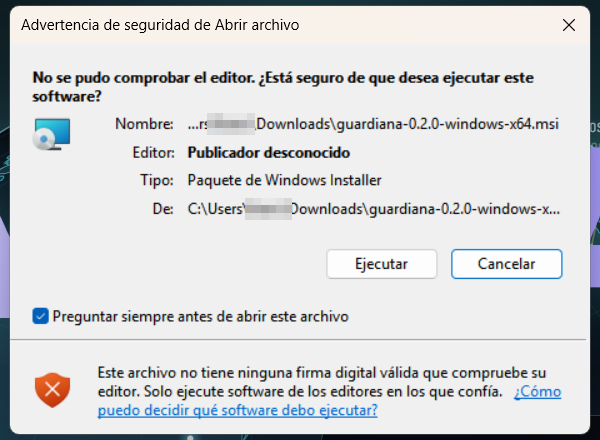
Windows shows a blue warning to installers its reputation system does not know yet. Without a publisher certificate it always appears; with one it still can, because since 2024 that reputation is earned through downloads and no certificate grants it, not even the expensive ones. Today we do not pay for a publisher certificate, and here is why: it would remove “Unknown publisher” but not the blue SmartScreen warning, which is earned through downloads; in the meantime we would rather spend that on keeping the program cheap and checkable. We do sign it: every release carries our minisign signature, and its hash is published before the file is. We do not teach anyone to skip warnings blindly: we teach you to verify, then to open. Once you check the file’s hash and signature, the warning no longer matters, because you no longer depend on Windows telling you whether to trust it.
It is also a technical decision: we do not intercept your traffic, we do not read content, we have no user account and no server holding your data. Less surface, less to attack.
We do not ask you to trust us. We give you the tools to check.
GUARDIANA was born in 2026 in Cartagena de Indias with an awkward question: why would anyone trust a new program placed in the middle of their home? Our answer is not to ask for trust. These are the commitments we make by design, and anyone can check them.
Francisco Salvatierra Sánchez
Founder and sole developer. Cartagena de Indias, Colombia. The same name that appears in the privacy notice and the terms: if something goes wrong, there is no department to hide behind.
The whole program is at github.com/guardianagroup/guardiana, under the GPL-3.0: you can read it, build it and check that what you install is what was published. This site sits next to it, in the same place. A personal account, no company behind it, so there is no doubt about who publishes what.
Write to hola@guardianagroup.com and I answer personally. What I promise and how fast is in /.well-known/security.txt. There is no money bounty; there is public credit in the release notes of the version that fixes it, if you want it.
Commitments we make by design
No black box. Every line that runs on your machine is public from day one.
The program inside the installer can be rebuilt and comes out with the same fingerprint, byte for byte: a machine that is not ours checks it. For the installer itself we publish its fingerprint and its signature, which is what you compare when you download it.
The hash and signature of every version go to the public ledger (and to Rekor) before the file can be downloaded. Nothing is deleted, not even by us.
We see service names, time and device. Not content, not how much data, not which app asked for it on a phone. We say so on every screen.
No user account, no server with your data, and nothing sent to us about how you use it. What does not exist cannot leak.
Those who promised to protect you sold your data. Those who sold you the device were listening. Public fines and rulings, with amount, date and a link to the file. And the 44 sources behind every figure on this site. The cases and the sources →